SOLID EDGE DATA MANAGEMENT – CAD DATA MANAGEMENT & PDM SOLUTION
MANAGE ENGINEERING DATA IN A UNIFIED ENVIRONMENT
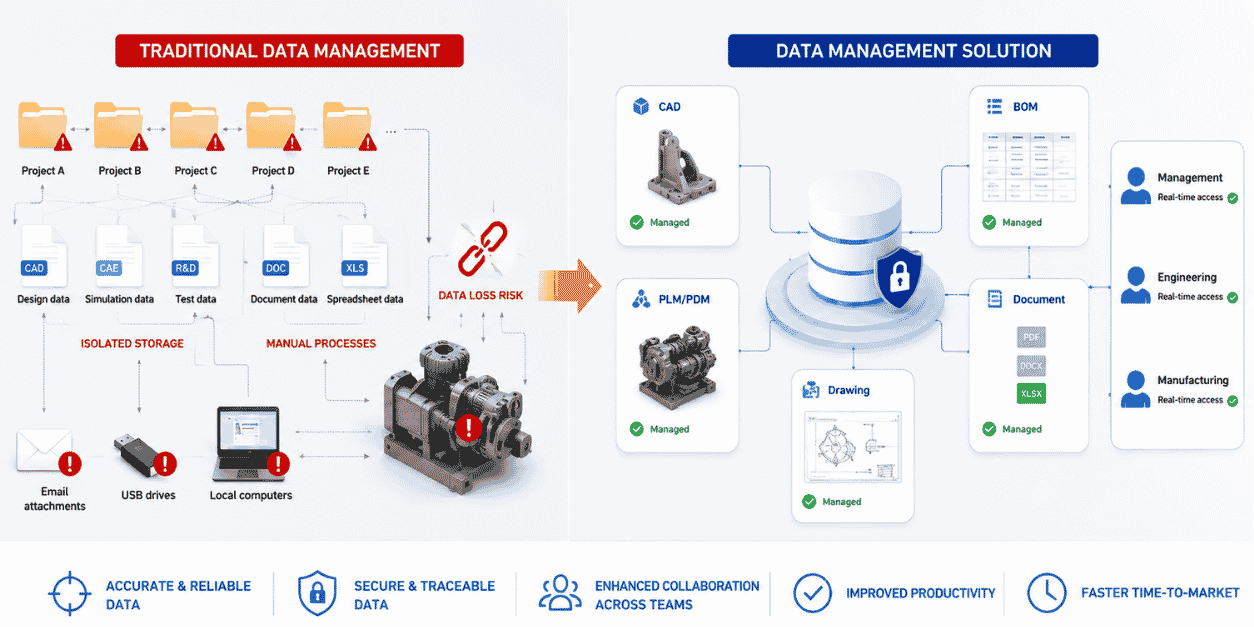
As product development activities expand, the volume of 3D CAD files, simulation data, Bills of Materials (BOMs), and released 2D drawings can increase rapidly.
When engineering data is stored across individual workstations or unmanaged network folders, operational risks arise continuously. Manufacturing teams may use outdated drawings, assembly links may break when files are renamed or moved, and multiple users may overwrite the same design data.
Solid Edge Data Management helps address these challenges by providing structured CAD data management capabilities designed for mechanical engineering environments.
The solution enables companies to standardize CAD data management processes, automate property assignment, control approval status, and accurately track design changes—all directly within the Solid Edge working environment.
WHAT IS DATA MANAGEMENT?
Solid Edge Data Management is a set of Product Data Management (PDM) capabilities developed by Siemens Digital Industries Software specifically for the Solid Edge design environment.
It creates a secure and structured data environment for managing relationships between:
- Parts
- Assemblies
- Engineering drawings
Core capabilities include
CAD Data Storage & Organization
Standardize folder structures, file naming conventions, and the relationships between related CAD files.
Search & Design Reuse
Quickly locate parts or assemblies based on product number, material, author, approval status, or other engineering attributes.
Revision Control
Accurately manage the design history of parts and drawings through revisions such as Rev A, Rev B, Rev C, and subsequent updates.
Release Status Management
Clearly identify file lifecycle states such as:
In Work → In Review → Released
This helps prevent unapproved data from being used in manufacturing.
Relationship Management During Data Restructuring
Solid Edge Design Manager supports copying, moving, and renaming large assemblies while preserving critical relationships between related CAD files.
Scalable PDM/PLM Roadmap
Companies can progressively expand toward Teamcenter Integration for Solid Edge when requirements grow to include enterprise workflows, approval processes, and company-wide BOM management.
5 COMMON RISKS WITHOUT A PDM SYSTEM
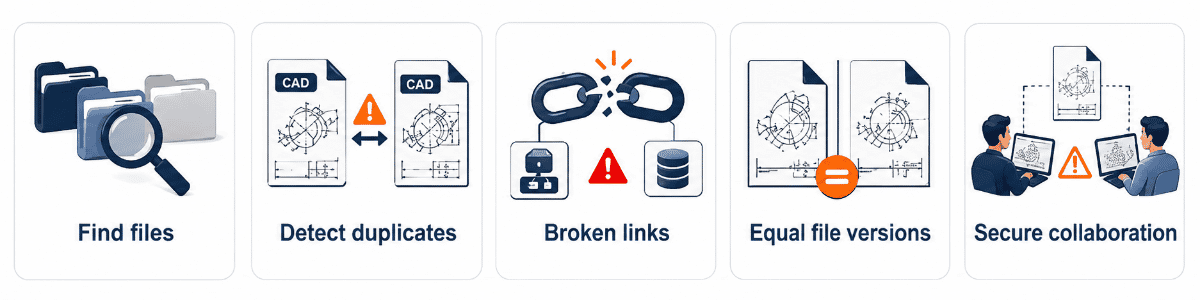
1. Difficulty Finding the Correct Design File
When engineering data is distributed across individual drives and folders, engineers can spend significant time searching for drawings, standard parts, or historical project data.
2. Using the Wrong Production Revision
CNC machining teams or subcontractors may manufacture parts from outdated drawings when the latest released revision is not properly controlled.
This can lead to material waste, scrap, and unnecessary rework.
3. Broken Assembly Links
Renaming, moving, or copying CAD files directly through Windows Explorer can break relationships between Part and Assembly files, resulting in missing references or incorrect 3D assembly structures.
4. Uncontrolled Data Duplication
When existing parts cannot be found easily, engineers may recreate standard components such as fixtures, flanges, or fasteners.
This increases storage volume and reduces engineering standardization.
5. Insecure Collaboration & Poor Access Control
Sharing engineering data through USB drives, email, or uncontrolled file-sharing channels can result in file overwriting, data leakage, and limited traceability of design changes.
KEY FEATURES OF SOLID EDGE DATA MANAGEMENT
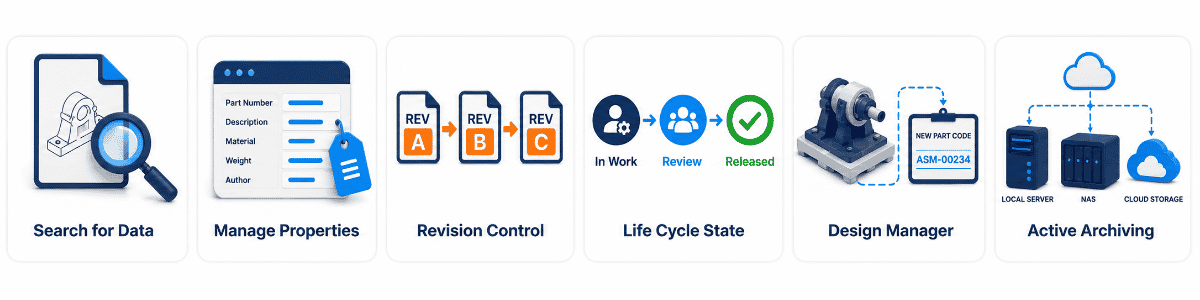
1. Fast CAD Data Search
Indexed search enables engineers to locate CAD files based on filename or custom properties such as:
- Title
- Author
- Material
- Document Number
- Part Number
This helps users retrieve engineering information within seconds rather than manually browsing through folders.
2. Centralized Property Management
View, edit, and update file properties across multiple components in an assembly without opening each individual 3D model.
This helps companies standardize engineering metadata across projects.
3. Revision Control
Create and manage new revisions when engineering changes occur, while retaining previous versions for traceability and reference.
For example:
Rev A → Rev B → Rev C
4. Lifecycle State Management
Manage lifecycle states such as:
- Available
- In Work
- In Review
- Released
- Obsolete
This helps prevent unauthorized modifications to drawings that have already been released to manufacturing.
5. Project Copying with Design Manager
Design Manager enables engineers to duplicate complex assemblies while assigning new identifiers to selected parts and retaining common standard components where required.
FLEXIBLE CAD DATA MANAGEMENT LEVELS
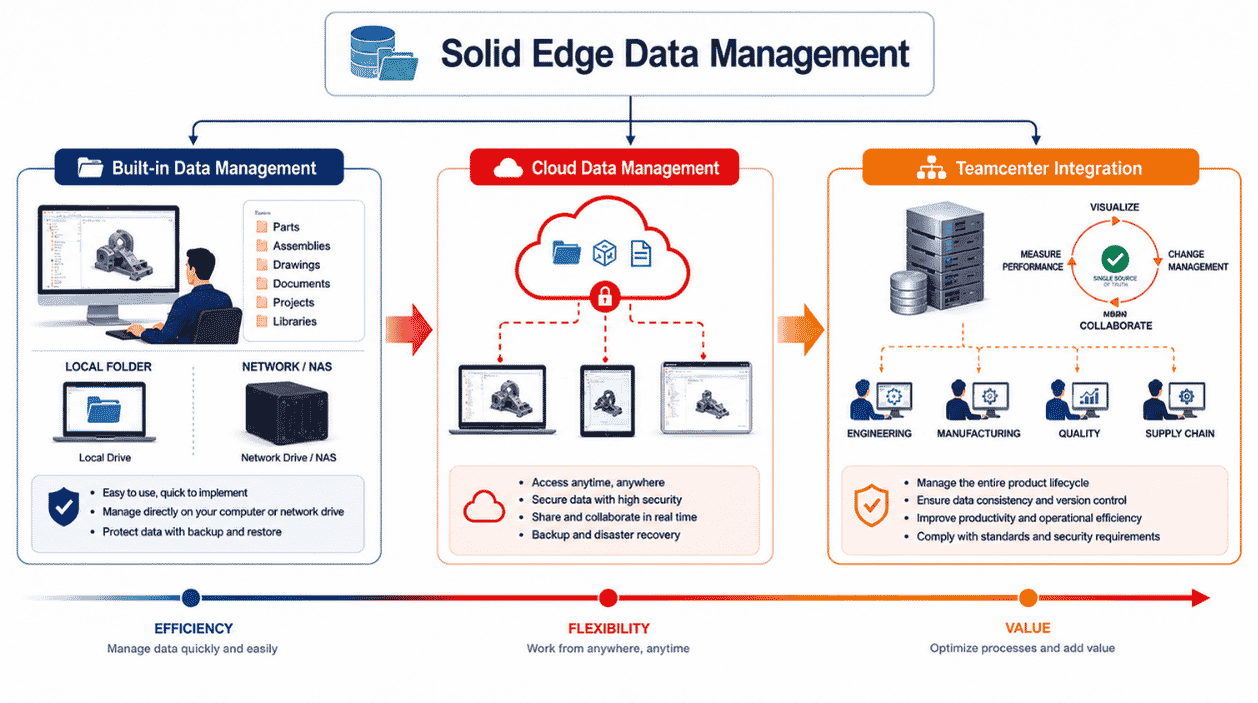
Siemens provides different levels of engineering data management that can scale according to company size and process maturity.
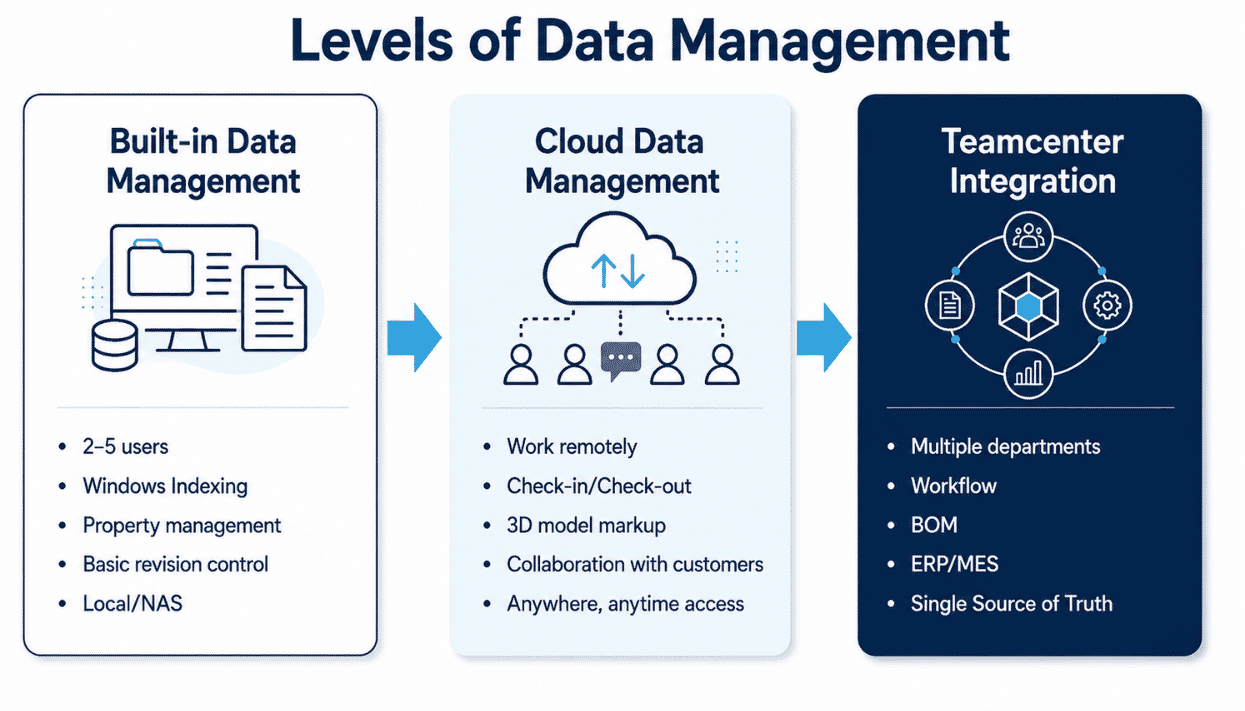
1. Built-in Data Management
Available directly within Solid Edge.
This approach can be suitable for small engineering teams that need structured CAD file management without immediately deploying a full enterprise PDM infrastructure.
2. Cloud Data Management
Cloud-based data management supports collaboration across engineering teams, managers, suppliers, and external partners.
Authorized users can access and share engineering information from different locations and devices.
3. Teamcenter Integration for Solid Edge
For companies requiring more advanced enterprise PDM/PLM capabilities, Solid Edge can be integrated with Teamcenter.
This enables mechanical, electrical, software, BOM, and other product data to be managed within a centralized Single Source of Truth.
6-STEP CAD DATA MANAGEMENT WORKFLOW
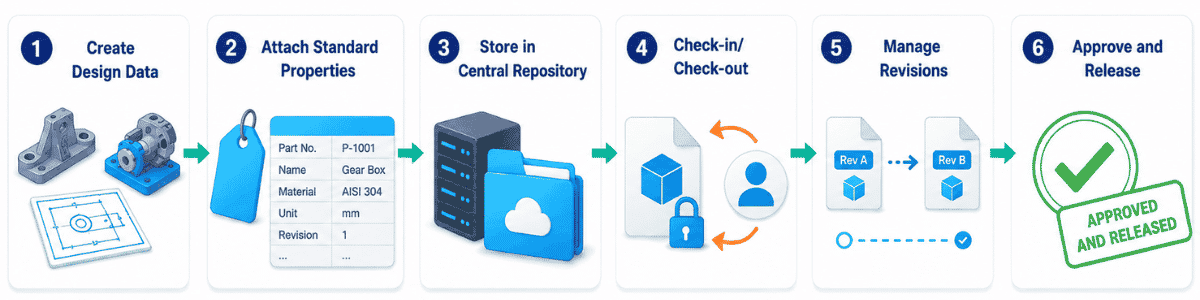
Step 1 – Create Engineering Data
Engineers create Parts, Assemblies, and Drawings using standardized company templates.
Step 2 – Assign Standard Properties
The system supports standardized engineering metadata such as:
- Part number
- Author
- Creation date
- Material
- Project information
Step 3 – Centralized Storage
Store engineering files within a controlled shared environment or PDM system rather than isolated local folders.
Step 4 – Check-in / Check-out Control
When one engineer checks out a file for modification, other users can be restricted to read-only access to prevent data conflicts.
Step 5 – Revision Management
When an Engineering Change Notice is issued, the system can preserve the previous revision and create a new controlled revision for further development.
For example:
Rev A → Rev B
Step 6 – Approval & Release
Managers or authorized reviewers verify the engineering documentation and change the file status to Released before it is transferred to manufacturing, procurement, or other downstream departments.
BUSINESS BENEFITS OF SOLID EDGE DATA MANAGEMENT
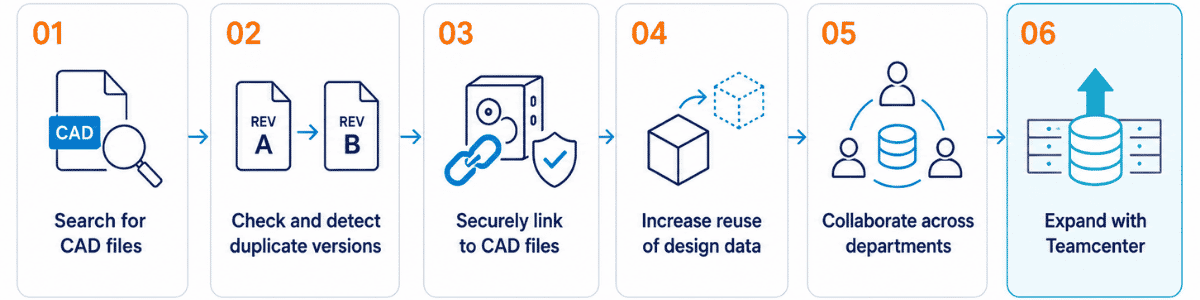
Faster File Retrieval
Property-based search enables engineers to retrieve historical project data and reusable components much more efficiently.
Reduce Revision Errors
Controlled release states help prevent draft or obsolete drawings from being used in manufacturing.
Maintain CAD File Integrity
Design Manager helps preserve relationships between Parts, Assemblies, and Drawings when engineering data is restructured.
Increase Design Reuse
Engineers can more easily locate and reuse existing standard components instead of recreating them.
Improve Cross-Functional Collaboration
Engineering data can be shared more consistently across:
Design → R&D → QA/QC → Procurement → Manufacturing
Scalable PDM/PLM Roadmap
Companies can progressively expand from local CAD data management toward Teamcenter-based PLM as their data and process requirements become more complex.
WHO SHOULD USE SOLID EDGE DATA MANAGEMENT?

Mechanical Design & R&D Teams
Suitable for teams managing large numbers of Parts, Assemblies, and Drawings across multiple projects.

Machinery & Automation Manufacturers
Suitable for companies designing machine components, gearboxes, mechanisms, fixtures, and automated equipment.
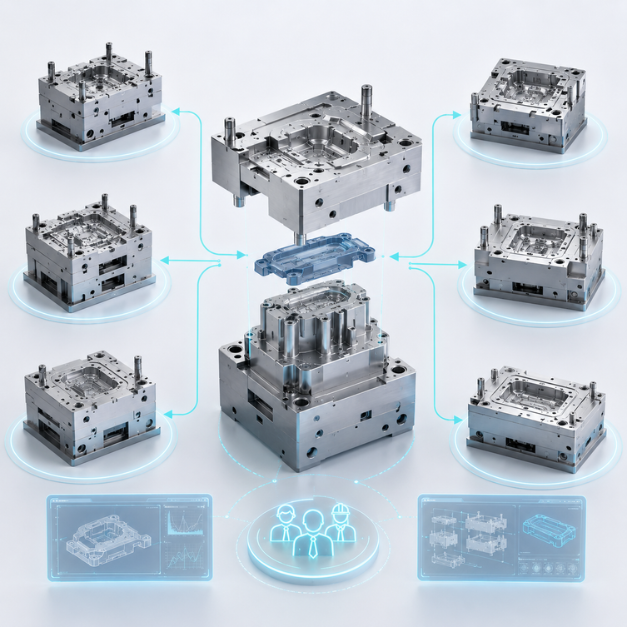
Multi-Department Manufacturing Companies
Helps organizations securely share approved drawings with manufacturing, procurement, quality, and other departments.

Growing Manufacturing Companies
Suitable for companies transitioning from unmanaged Windows folders toward a more structured Solid Edge PDM environment.
TOP SOLUTIONS – SIEMENS PDM/PLM IMPLEMENTATION EXPERTISE
Implementing structured CAD data management involves more than installing software. It requires a clear understanding of engineering data structures, part-numbering conventions, revision rules, approval workflows, and manufacturing processes.
Top Solutions supports manufacturers in designing and deploying an appropriate PDM roadmap.
Siemens Gold Partner
Provide licensed Siemens solutions and professional implementation support.
Data Assessment & Consulting
Assess existing engineering data structures and recommend appropriate naming conventions, custom properties, revision policies, and approval workflows.
Phased Implementation Roadmap
Support companies in progressing from Built-in Data Management toward cloud-based collaboration or advanced Teamcenter implementation according to business requirements and investment plans.
On-Site Training & Knowledge Transfer
Train engineering and management teams on:
- Check-in / Check-out
- Revision Control
- Lifecycle States
- Design Manager
- Project copying and data restructuring
Long-Term Technical Support
Provide ongoing assistance with CAD file relationships, engineering libraries, access permissions, and system standardization.
DATA MANAGEMENT CONSULTATION & QUOTATION
Please complete the form below. A Top Solutions PDM/PLM specialist will contact you to discuss your engineering data management requirements and recommend the appropriate solution.
FREQUENTLY ASKED QUESTIONS (FAQ)
Is Solid Edge Data Management a standalone PDM system?
Solid Edge Data Management is a set of CAD/PDM data management capabilities designed for Solid Edge.
It helps engineering teams store and search CAD files, manage properties, control revisions, and release engineering drawings in a structured and secure environment.
Does Data Management require an expensive server infrastructure?
Not necessarily.
Basic Built-in Data Management capabilities are available within Solid Edge. Companies that require more advanced enterprise PDM/PLM processes can extend the environment through Teamcenter Integration for Solid Edge.
How does Revision Control work in Solid Edge?
Not in every case.
For Built-in Data Management, smaller engineering teams may be able to use their existing LAN/NAS infrastructure and Windows indexing capabilities without immediately deploying a large enterprise database environment.
Does Solid Edge support cloud-based data management?
When a design change is required, the previous revision can be retained—for example, Rev A—while a new revision such as Rev B is created for continued engineering work.
Related assemblies and drawings can then be managed with controlled file relationships and revision history.
Does Solid Edge support cloud-based data management?
Yes.
Siemens provides cloud-enabled collaboration and data management capabilities that can support secure access, file sharing, 3D model review, and collaboration with internal or external stakeholders.