In a conventional product-development workflow, engineers often need to simplify geometry, repair a model and create a finite element mesh before structural analysis can begin. These activities can consume a significant portion of a simulation project, especially when the CAD data contains many parts or a complex assembly.
Simcenter™ Simsolid™ software is a structural simulation and analysis solution for designers, mechanical engineers and simulation specialists. It analyzes full-featured CAD assemblies without requiring the geometry simplification and traditional meshing steps associated with many finite element workflows.
By reducing model-preparation work, Simcenter Simsolid enables engineering teams to evaluate more design alternatives earlier, identify areas that require improvement and make simulation-informed decisions before committing to physical prototypes.
What is the new name for Altair SimSolid?
Following the integration of Altair simulation technologies into the Simcenter portfolio, the official product name changed:
Altair SimSolid → Simcenter Simsolid
Prospective users may continue to search for “Altair SimSolid” or “SimSolid software.” However, companies should use Simcenter Simsolid when referring to the current Siemens product.
The change is more than a standalone branding update. Simcenter Simsolid now sits within the Simcenter mechanical and manufacturing simulation offering, allowing organizations to evaluate it as part of a broader environment for simulation, testing and digital product development. Related engineering technologies are available in the Top Solutions products and solutions library.
How does Simcenter Simsolid differ from a traditional FEA workflow?
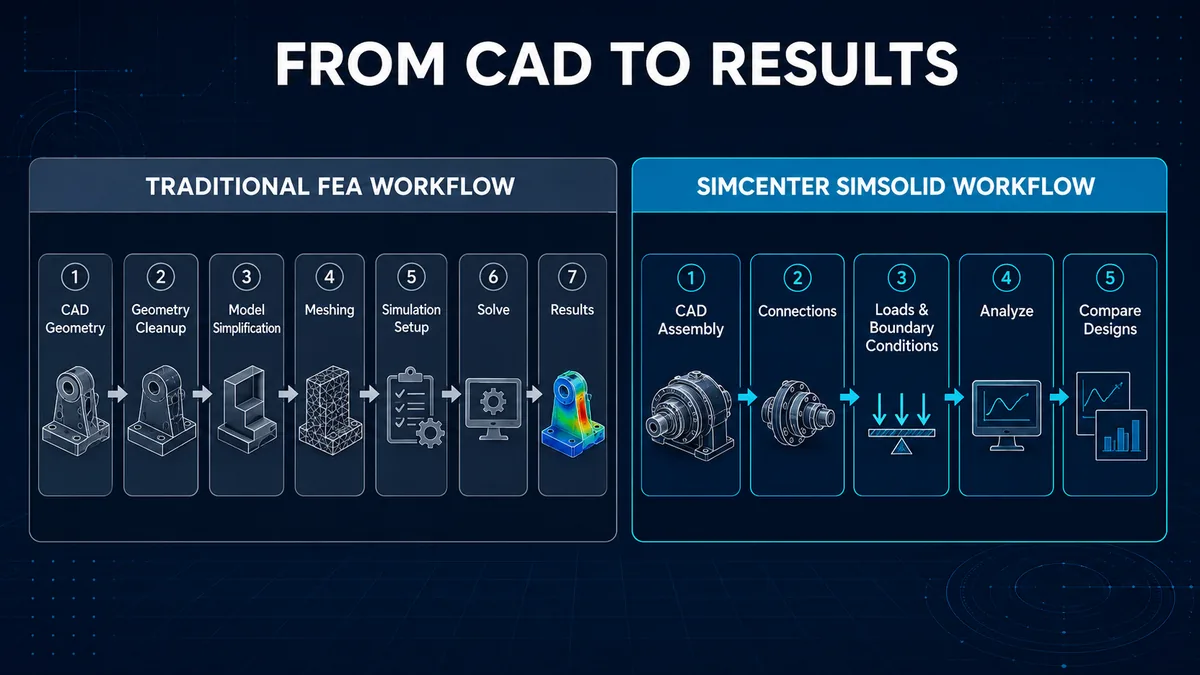
A mesh-based FEA workflow commonly includes:
CAD → Geometry cleanup → Model simplification → Meshing → Simulation setup → Solve → Results review
Simcenter Simsolid instead focuses on using full-featured CAD geometry directly:
CAD Assembly → Connections → Materials, Loads and Boundary Conditions → Analysis → Design Comparison
| Evaluation area | Mesh-based FEA workflow | Simcenter Simsolid workflow |
|---|---|---|
| Geometry preparation | Often requires defeaturing or cleanup | Designed to use full-featured CAD geometry |
| Meshing | Required | No traditional finite element meshing step |
| Large assemblies | May require substantial simplification | Designed for complex parts and large assemblies |
| Design studies | Can require repeated model and mesh preparation | Supports rapid comparison of design scenarios |
| Primary users | CAE specialists and simulation engineers | Designers, design engineers and simulation analysts |
This distinction does not mean that every CAE problem should move to a single workflow. Simcenter Simsolid is particularly relevant when a company needs early structural insight, must work with complex CAD data or wants to evaluate more alternatives during product development.
Key Simcenter Simsolid capabilities
Analyze full-featured CAD assemblies
Simcenter Simsolid is designed to handle complex parts and large assemblies, including models with rough contact surfaces, gaps or overlapping geometry. This reduces the need to create an analysis model that is substantially different from the original design data.
Eliminate two time-consuming preparation steps
The software removes the need for traditional geometry simplification and meshing. Engineers can spend more time defining loads, boundary conditions and connections, then interpreting results, rather than concentrating primarily on model preparation.
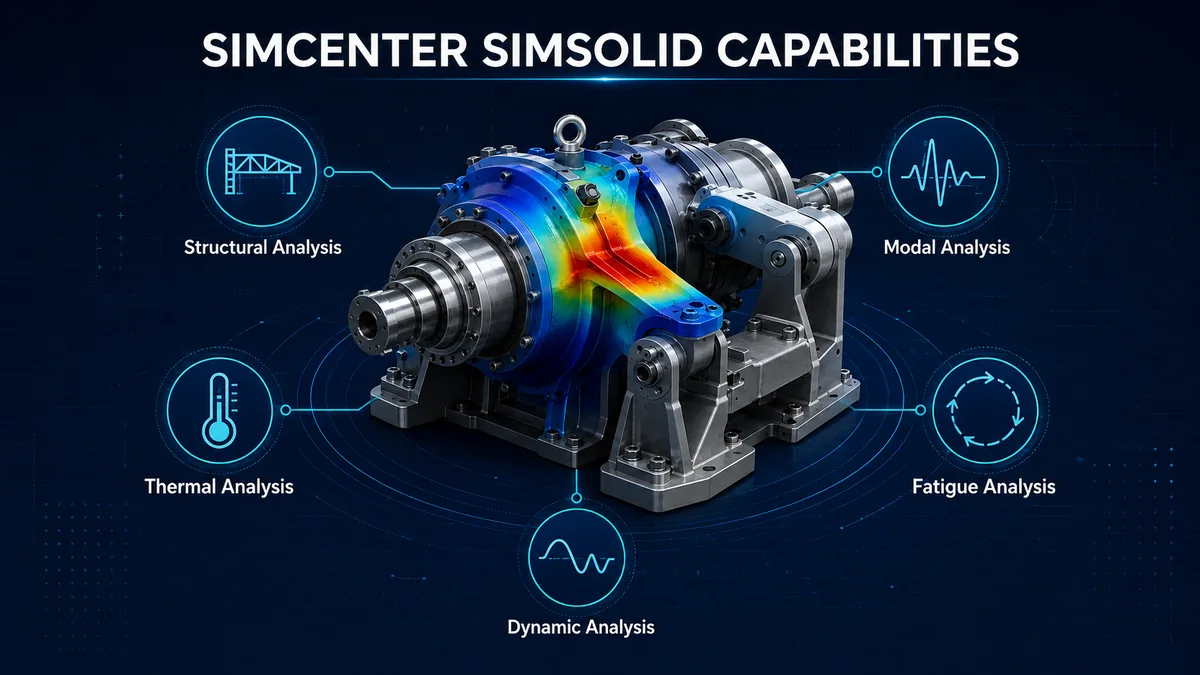
Support a broad range of structural analyses
Capabilities published by Siemens include:
- Linear and nonlinear static analysis
- Modal analysis
- Thermal analysis
- Thermal stress analysis
- Fatigue analysis
- Buckling analysis
- Time- and frequency-domain dynamic analysis
- Global-local analysis
- Composite analysis
- Random response
- Squeak and rattle analysis
Actual availability may depend on the product configuration and license selected by the organization. Capabilities should therefore be checked against the intended use case, software release and commercial package before deployment.
Model connections and materials
Engineers can represent bonded, sliding and separating contacts with friction, as well as bolts, virtual connectors, welds, rivets, adhesives, joints and bushings.
Simcenter Simsolid also supports multiple material types, including isotropic, orthotropic, elasto-plastic and rigid materials, along with gas and liquid bodies for applicable problems.
Apply practical loads and boundary conditions
Users can define immovable, sliding and hinge constraints, forces, pressure, gravity, thermal and inertial loads, inertia relief, bolt and nut tightening, hydrostatic pressure, bearing loads, distributed mass and remote loads.
Correctly representing operating conditions remains critical to the quality of any model. Faster model preparation does not remove the need for sound mechanics, appropriate engineering assumptions and result verification.
Work with major CAD and PLM formats
Simcenter Simsolid supports formats from widely used systems such as CATIA, NX, PTC Creo, Inventor, Fusion 360, SOLIDWORKS, JT, STEP, Parasolid, ACIS, PLMXML, CGR and STL. Siemens also lists direct integrations with Onshape and Teamcenter.
Multi-CAD interoperability is especially relevant to manufacturers that receive design data from customers, suppliers or departments using different engineering platforms.
Review and communicate simulation results
Results can be explored through contour plots, animations, XY plots, probes and detailed data for stress, strain, displacement, safety factors, modal frequencies and mode shapes. Engineers can also inspect results on datum planes or cut sections and evaluate multiple load cases.
Simcenter Simsolid vs. Simcenter Hypermesh
The two products contribute to CAE workflows in different ways and should not be presented as direct replacements for one another.
Simcenter Simsolid focuses on rapid structural analysis of full-featured CAD geometry without traditional meshing. It supports simulation-driven design, design-space exploration and the use of simulation by design engineers.
Simcenter Hypermesh focuses on simulation modeling and pre-processing, supporting workflows that require more detailed control over model preparation, meshing and simulation data.
The appropriate solution depends on the analysis objective, required modeling control, solver strategy, validation requirements and the capabilities of the engineering team.
Potential benefits for manufacturing companies
Move simulation earlier in the design cycle
When model-preparation time is reduced, design engineers can test critical assumptions before a design progresses deeply into approval or manufacturing.
Compare more design alternatives
Teams can investigate changes to geometry, materials, thickness or connection strategies across multiple concepts. The objective is to eliminate weak alternatives early instead of analyzing only one nearly completed design.
Improve collaboration between CAD and CAE teams
Simcenter Simsolid can create a rapid-analysis layer between designers and CAE specialists. Designers receive earlier feedback, while simulation experts can focus their effort on problems that require deeper modeling and higher levels of validation.
Retain more design detail during early evaluation
Analyzing full-featured CAD data helps teams keep more design detail in initial studies. Organizations must still establish appropriate review procedures and correlate results with testing or another validated method for safety-critical and certification-driven applications.
Who should evaluate Simcenter Simsolid?
The solution may be relevant to:
- Mechanical designers who need rapid feedback on CAD concepts
- R&D engineers introducing simulation earlier in development
- Simulation engineers evaluating many design variants
- Industrial machinery and equipment manufacturers
- Automotive, aerospace, energy and industrial-product companies
- Engineering teams working with large assemblies or multi-CAD data
- Technical managers expanding simulation-driven design across the organization
Decision-makers should assess more than a feature list. Current workflow, design-change frequency, analysis types, validation requirements, user skills and data integration all affect the business case.
When should a company consider Simcenter Simsolid?
Simcenter Simsolid deserves evaluation when one or more of the following conditions apply:
- Geometry cleanup and meshing slow down design iterations
- Engineers need to analyze large, detailed CAD assemblies
- The company wants to compare more alternatives before design release
- The CAD team needs earlier structural feedback from CAE
- Design data originates from multiple CAD systems
- The organization wants to make simulation accessible to more engineers while retaining review and validation controls
If a problem requires a specialized finite element model, detailed mesh control or a prescribed verification method, the company should also evaluate advanced CAE tools instead of assuming that one solution should replace its complete workflow.
Evaluation criteria before deployment
A proof of concept should use the company’s own engineering data and answer these questions:
- Can Simcenter Simsolid handle the organization’s representative assemblies reliably?
- How does CAD-to-result time compare with the current workflow?
- Are the required materials, connections, loads and boundary conditions supported?
- Can results be correlated with physical tests or an established simulation baseline?
- Who will create the analyses, and who will approve their use in engineering decisions?
- How will model versions, data and reports be managed?
- Do the license configuration, computing environment and training plan support the intended rollout?
Top Solutions supports manufacturing companies with CAD/CAM/CAE/PLM solutions. Explore the Top Solutions product and solution portfolio to discuss a proof of concept based on representative CAD models and engineering requirements.
Conclusion
Simcenter Simsolid is a structural simulation solution that analyzes complex parts and full-featured CAD assemblies without two preparation steps that can consume significant engineering time: geometry simplification and traditional meshing.
Its main value is not limited to solver speed. Simcenter Simsolid can move simulation earlier in the design loop, enable teams to compare more alternatives and improve collaboration between CAD and CAE roles.
Companies should begin with a proof of concept based on representative engineering data, clearly defined analyses, correlation criteria and result-approval responsibilities. This approach provides a more reliable assessment of Simcenter Simsolid than selecting software from a feature list alone.